
AI Assistance — Built into every module, not bolted on
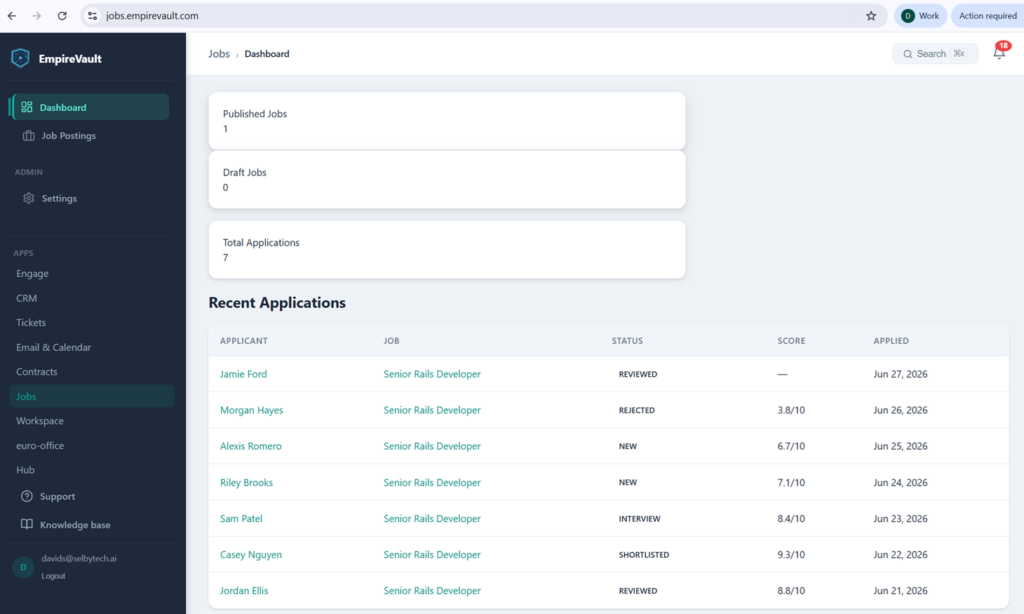
Every module scores, ranks, or drafts with AI — like the candidate ranking shown here — and a human always signs off before anything ships.
- Every module ships AI built for its own job — not a bolted-on chatbot
- Humans approve every AI decision before it reaches a customer or a candidate
- AI is included in your seat price — no per-call billing, no overage charge
- Full audit trail on every AI suggestion, override, and acceptance
Start Free Trial
Free for 21 days. No card required.
Every EmpireVault module ships with AI capabilities specific to its job. AI doesn’t sit in a separate “AI tab” you remember to open — it scores leads as they come in, drafts replies as you open tickets, ranks candidates as you screen them, extracts contact details from email automatically, and grounds an in-app help assistant in your knowledge base. Humans approve every decision before it goes out. AI is included in your seat price, with no per-call charges.
What the AI actually does, by module
Lead scoring (Engage + CRM)
Every chat conversation captured by Engage and every lead imported into the CRM gets an AI score: weak, moderate, or strong. The score considers conversation signals (urgency, decision-making authority, budget indicators), engagement patterns (response time, message length, return visits), and firmographic context where available. Scores update as new interactions happen.
Ticket triage (Tickets)
Incoming tickets get a suggested category, priority, and a draft reply built from the ticket, its public comments and the customer’s CRM record. Your support agent sees the suggestions inline — accept, edit, or reject, and mark any suggestion helpful or incorrect.
Drafts, summaries and next steps (Email & Calendar)
In a reply, forward or new message, type what it should say and press Draft with AI; the draft follows your own writing style, learned from a description you keep and up to three of your recent emails. Press Summarise on a long thread for who wants what, what was agreed and what is still open, with up to three suggested next steps that open a reply, a task or a meeting for you to finish. On for every organisation, and an admin can turn it off. Each person has 100 requests a day and an organisation 1,000. Nothing is sent, booked or filed until you press the button that does it.
Importance scoring (Email & Calendar)
Incoming emails are scored 1-5 for importance based on sender history, subject patterns, and body content. VIP contacts auto-elevate. The high-importance feed lets you triage 200 morning emails in 10 minutes — top 5 first, the rest collapsed.
Contact extraction (CRM)
When a new email arrives from a sender you don’t have on file, AI extracts their name, role, and company from the signature and creates a draft contact record. Your team approves the draft (or edits and approves) before it commits. The rescan feature can backfill contacts from your historic email — useful right after onboarding.
Candidate ranking (Jobs)
Resumes uploaded via your careers page are auto-parsed and scored against the job description. AI returns a fit summary and a rationale you can read — not a black-box number. CV content is indexed for keyword search, so “find me everyone who’s worked with Postgres” returns the right candidates instantly.
Email personalization (Campaigns)
Drip sequence drafts can be generated from a campaign brief and tone settings. Personalization uses contact and organization fields (name, role, industry, recent activity) — every draft is editable before it sends.
Feature-request analysis (Tickets backlog)
Customer feature requests are semantically clustered so duplicates collapse together. Each cluster gets an AI-generated impact, effort, and strategic alignment score; the composite ranks your backlog. Your team still decides what to ship — the AI just stops you from re-reading the same request 14 times under different wording.
In-app Help Assistant (every account)
A chat widget that answers user questions in plain English, drawn from your knowledge base. It searches your articles, picks the most relevant passages, and answers using only what your KB actually says. If it can’t find an answer, it offers to open a ticket. Real grounding — not generic LLM hallucination.
Governance — cost, control, and trust
AI included, with a usage allowance
AI use is included in your seat price: there is no per-call billing and no overage charge. Built-in allowances sit far above normal use — the ticket assistants alone allow 40,000 calls a day and 400,000 a month — usage is logged and reported in the Tickets insights view, and an admin can switch the assistants off in the Tickets and Jobs settings at any time.
Humans in the loop
Drafts, suggested replies and routing suggestions are reviewed by a person before anything is sent or changed; every draft is editable and every suggestion can be rejected. Scoring and the website chat agent act on their own, within the rules you set.
Audit trail on every AI action
Every AI suggestion, override, and acceptance is logged in the platform audit log. Useful for compliance, training, and answering “why did the system decide that?” months later.
Your data is your data
OpenAI is the underlying model. Per our integration agreement, no data sent to OpenAI is used for model training. You can request a full export of every prompt and response we’ve ever sent for your account at any time.
What makes AI Assistance different
It’s the context that makes it good
Generic LLM tools can draft an email. They can’t draft an email that knows the recipient opened a ticket last week, that the open quote is at $42k, or that the calendar shows you’d discussed this on Tuesday. EmpireVault’s AI starts with that context — because it lives where the data does.
No “AI add-on” upsell
AI features aren’t a separate tier or upsell. They’re part of your subscription. Usage budgets are set per account, with daily and monthly caps you control. Predictable, transparent, no salespeople involved.
It learns from your overrides
Mark any suggestion helpful or incorrect, and that feedback is kept with the ticket. Mail importance scoring stops asking the AI about a sender whose mail you keep ignoring, and a sender rule or a VIP flag overrides it. Mail drafts follow a writing style you control. The model is not retrained on your data.
Let AI do the busywork.
Start a 21-day free trial. Watch AI score, triage, and draft as you use the platform.
Related features
Prefer to have it built and led for you? EmpireVault is included with Selbytech Fractional CTO + Platform engagements →