
Workspace — The connective tissue your team works through
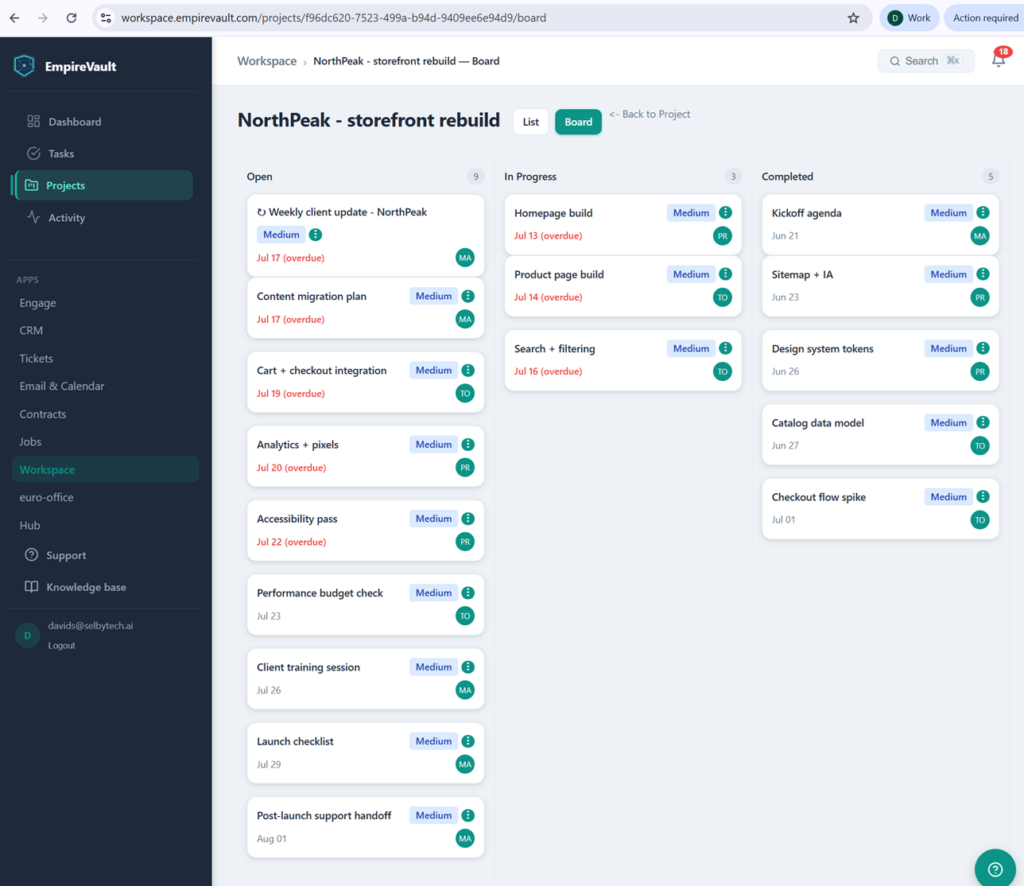
Roll every task into a project board your whole team can see — who’s blocked, what’s overdue, what’s done.
- Tasks attach to any record — a contact, a deal, a ticket, a quote — not a standalone list
- Group related tasks into a project; the board shows overall progress at a glance
- Comment threads and @mentions stay attached to the record they’re about
- A client portal without client logins — share progress by a revocable link
Start Free Trial
Free for 21 days. No card required.
Workspace is the layer that turns isolated records into team work. Tasks linked to a contact. Projects rolled up across an account. Comments threading on a quote. Notifications that fire when something you own actually changes. Built into every other module — not a separate app you remember to open.
How it works
1. Create a task anywhere
“Follow up with Sarah” right from her contact page. “Quote needs legal review” right from the quote. “Re-verify their domain” right from the ticket. Tasks attach to the record they came from — no copy-pasting context.
2. Filter, prioritize, and stay in flow
Your dashboard pulls every task assigned to you, every comment you’re tagged in, and every record where your name shows up. Filter by due date, priority, project, or assignee. The view is yours alone — what your team sees stays scoped to their permissions.
3. Roll work up into projects
Group related tasks under a project — a customer onboarding, a launch, a quarterly campaign. The project page shows progress across the whole effort, who’s blocked, and which deliverables are slipping. Comments thread, notifications fire, and the underlying records stay live where they are.
Capabilities
Tasks attached to any record
Polymorphic linking means a task can attach to a contact, a lead, an organization, a deal, a quote, a contract, a ticket, a campaign — anything in the system. Open a contact, see every open task on them. Close the task, the linked record reflects it. No standalone task-list silo.
Projects with rollup status
Bundle related tasks and records into a project. The project dashboard shows overall progress, who’s blocked, and where time is slipping. Useful for onboardings, complex deals, launches, or anything spanning more than one person and more than one record.
Comments + @mentions
Comment threads on any task, project, ticket, or record. @mention a teammate and they get notified. Threads stay attached to the record they’re about, so reopening a contact two months later means you can read the conversation that happened around it.
Notifications that don’t pile up
Configurable per-user notification preferences. Choose what triggers an in-app notification vs an email digest vs nothing at all. Daily digest summary by default — surfaces only the things that need your eyes. Granular enough to silence the noise; not so granular it takes 20 minutes to set up.
Daily reminder digest
One email per morning showing what’s due today, overdue, and assigned to you this week. Designed so a team member who only opens EmpireVault when they need it still knows what they need to do.
Permission-aware by default
Tasks, comments, and projects inherit visibility from the record they’re attached to. If a teammate can’t see the deal, they can’t see the task on the deal. If a role can’t read a customer’s tickets, they don’t see comments on those tickets. No accidental exposure.
A client portal without client logins
Share any project by a revocable, expirable link — no accounts, no per-guest seat fees. Clients see the tasks you’ve made visible with live progress counts, comment on the project or on individual tasks, and request new work. Requests arrive as pending-approval tasks — never straight onto your board — and every portal action notifies the project team and lands in the audit log.
What makes Workspace different
Not a separate app
Asana, Monday, ClickUp, Notion — they’re all great. They’re also all another app to remember, another login, another data island. Workspace is the task layer that already lives where your customer work happens, with no integration to set up.
Tasks know what they’re about
A standalone task tool can hold a checklist. It can’t tell you that this task is on a $40k deal, that the customer is a VIP, that there’s an open ticket from yesterday on the same account. Workspace tasks come with that context built in — because they live alongside the records.
Nothing falls through the cracks
The same notification system that pages your support team when a ticket goes silent pages your sales team when a quote follow-up is overdue. One notification system, one digest, one inbox of things-to-do-today.
Bring your team’s task list into the rest of the platform.
Start a 21-day free trial. Your first task can be “set up the rest of the team in EmpireVault.”
📖 Deep dive: read our guide to team workspace for CRM.
Related features
Prefer to have it built and led for you? EmpireVault is included with Selbytech Fractional CTO + Platform engagements →