
Euro-Office — A private document workspace, built into EmpireVault
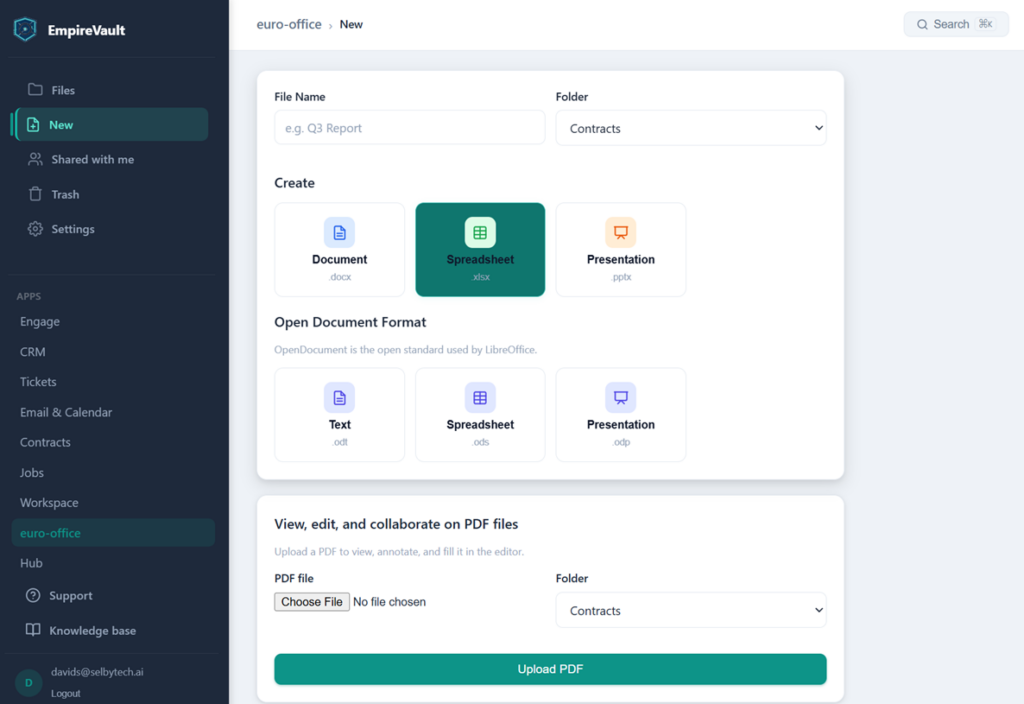
Create a Word, Excel, PowerPoint, or open-format document — or edit a PDF — without leaving EmpireVault.
- Create and edit Word, Excel, PowerPoint, and OpenDocument files — live in the browser
- Real-time co-editing; everyone’s changes land in one shared history
- Upload a PDF to view, annotate, and fill it in directly
- Runs on an independent cloud, not Amazon, Google, or Microsoft
Start Free Trial
Free for 21 days. No card required.
Euro-Office adds a full document workspace to EmpireVault — store and share files, then open, edit, and collaborate on Office and OpenDocument documents right in your browser. It runs on an independent cloud — not Amazon, Google, or Microsoft — and is built on open formats, and it lives in the same account as your CRM, quotes, contracts, and tickets. No third-party drive, no separate login, and your documents never touch Google or Microsoft servers.
Euro-Office is now a working collaborative document suite. Store and organise your files; share them with your team, with invited outside collaborators, or by public link; open and edit documents in the browser with several people working in the same document live; and step back through version history with one-click restore — all under admin governance controls: version retention limits, watermarked view-only sharing, and macro execution blocked across the workspace. We build in the open — the status below shows exactly where each of the seven phases stands, with comments and mentions, full-text search, CRM and e-signature links, and a dedicated EU deployment still to come.
What Euro-Office brings
Your documents, on your platform
Files and documents live inside EmpireVault, not scattered across a separate cloud drive. Store, organise, and find them next to the customer record, deal, or contract they belong to — and reach them with the same login and the same permissions as the rest of your platform.
Private and open by default
Euro-Office runs on an independent cloud — not Amazon, Google, or Microsoft — so your documents stay off Big Tech, where they cannot be scanned, indexed, or mined for training data. It is built on open document formats, which means no proprietary lock-in and no surprise migration fees if your needs change. Your data is yours.
One data layer
Because documents share the same database as the rest of EmpireVault, a contract sits with its deal, a proposal sits with its contact, and a signed file sits with its ticket — with no integration to set up and nothing to sync.
Building in the open
Implementation status
Euro-Office ships in phases. Here is exactly where each capability stands today.
Last updated: 3 September 2026
Store, organise, upload, download, and restore files and folders.
Share with your team, or invite outside collaborators by verified email to view or edit — no account needed. Anonymous view links with optional expiry and password. Owners control every share; admins oversee and can revoke all external access, with a full audit trail. Shared drives give a team one place to work, with viewer, contributor, content manager, and manager roles, and can be archived and restored.
Open and view Office and OpenDocument files in the browser, with formatting preserved.
Create and edit Word, Excel, PowerPoint, OpenDocument, and PDF files in the browser with autosave — including for invited external collaborators. Every editing session is kept in a version history: see who saved what and when, download any earlier version, and restore it with one click. Restoring never deletes anything — the newer versions stay in the history too. Admins choose how many versions to keep per document (or keep them all), view-only opens by outside collaborators and public-link visitors carry an on-page watermark, and document macros never run — files can’t execute code in anyone’s browser. On a phone or tablet the editor switches to a touch layout automatically.
Multiple people edit the same document live — everyone with edit access joins the same session, sees each other’s cursors, and the whole team’s work lands in one version history entry credited to every contributor. Invited external collaborators join the very same live session.
Comments and @mentions, notifications, full-text search, version compare, CRM and e-signature integration, and reporting.
Build out a new EU-based instance for full data sovereignty.
Private mail & calendar
Planned. We intend to add hosted mail and calendar on an independent backend that keeps your mail off Google and Microsoft, so email, calendar and documents sit under one roof. It is not available yet. Today, Euro-Office is the document workspace described above, and your existing mailboxes connect through Email & Calendar.
Put your documents where your customer work already lives.
Start a 21-day free trial and put the full document workspace to work today — live co-editing included. The remaining phases land here first. Prefer a guided setup? Have us build it for you.
Related features
Prefer to have it built and led for you? EmpireVault is included with Selbytech Fractional CTO + Platform engagements →