
Quotes — Built for the way SMBs actually sell
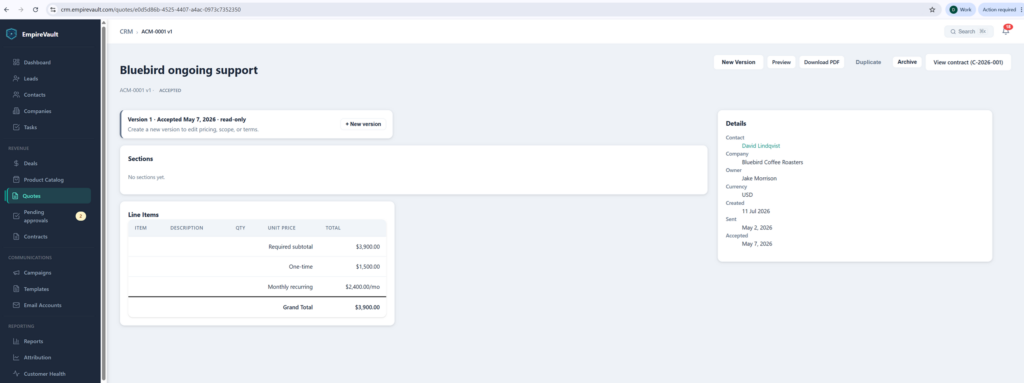
Once a customer accepts, the quote locks — line items, totals, and a straight line to the contract, all in one place.
- Every revision saved as its own version — compare, reopen, or send the latest
- Approved quotes lock automatically; line items and totals can’t drift after the fact
- One click turns an accepted quote into a contract, invoice, or retainer
- Multi-step approval routing by discount, value, or customer segment
Start Free Trial
Free for 21 days. No card required.
EmpireVault Quotes is a full sales-document engine: build versioned proposals with branded templates and a reusable clause library, route them through multi-step approvals, ship them out as PDF or public link, and turn an accepted quote into a contract, an invoice, or a retainer in one click. Every quote stays linked to the deal, the contact, and the calendar event that produced it — and the entire history is reproducible from the audit log.
How it works
1. Build from a branded template
Start from one of your saved templates — they carry your brand, your boilerplate sections, and the right tax/discount/payment defaults. Drop in line items by hand or pull them from a product catalog. Bundle related items, mark some optional, set rollup totals.
2. Route for approval
For larger quotes, configure approval rules — by discount percentage, total value, customer segment, or any combination. The quote auto-routes to the right approvers, with request-changes lifecycle if they need edits. Re-evaluation is smart: if you change a line, only the affected approvers need to re-approve.
3. Send, win, convert
Deliver as a branded PDF or a public link with the customer’s own toggleable optional items. The moment they accept, the quote freezes — the PDF is sealed, the line items are locked, and you can fire one click to turn it into a Contract for signature, an Invoice, or a Retainer with a starting ledger balance.
Approvals & versioning
Quote groups + versioned quotes
Every revision of a quote is preserved as its own immutable version inside a parent quote group. You can compare versions side-by-side, send the customer the latest while keeping the history, and reopen any prior version if a deal scope changes back. No more “Final-FINAL-v3.pdf” naming.
Multi-step approval routing
Configure rules that fire approvers in sequence — sales manager first, then finance, then legal. Each step has its own approval policy (one-of, all-of, or quorum). Approvers can approve, decline with reason, or request changes; request-changes sends the quote back to the author with the inline comments. Smart re-evaluation only re-approves the steps affected by changes.
Lock on approval
Once a quote is approved and sent, the line items, discounts, and tax lines are locked. If you need to change them, the system requires you to create a new version — keeping the audit trail clean and preventing “we sent them this number then changed it later” disputes.
Step advancer + approver queue
Approvers see their queue in one place, with sortable filters by deal size, age, and customer. The StepAdvancer handles forward and backward transitions automatically — there’s no “okay who’s next” guessing game.
Bundles, optional items & the public quote page
Drag-to-nest bundles
Group related line items into a bundle. Bundles can be rolled-up (sum of children, single price line shown to the customer) or fixed (you specify a total, children are shown as proof). Bundles nest, so you can model a complex SOW as a hierarchy that still presents cleanly.
Optional items & add-ons
Mark line items as optional. On the public quote page, customers see them in a separate “Optional add-ons” section and can toggle items in or out live — the total recalculates instantly. The accepted version snapshots whatever they chose, locking the row state at acceptance.
Three-card public layout
Customers receive a public link. The page renders a clean three-card layout — Quote summary, Line items with optional toggles, and Acceptance — with your brand, signature affirmation, and a single “Accept” button. No login required, no client portal sign-up dance.
Multi-currency display
Display the quote total in the customer’s currency without changing the underlying numbers. Useful for cross-border SMB deals where you operate in one currency but want to communicate in another. Display-only — no FX risk added.
From accepted quote to active customer
One click → Contract
Turn the accepted quote into a Contract document, pre-filled with the line items, your terms, and the signer block. Send it through the e-signature flow without re-keying anything. Decline-with-reason and audit trail flow back to the parent quote.
One click → Invoice
Generate an invoice from the accepted quote. Payment terms come from your template default; payment method, currency, and tax lines are carried over.
One click → Retainer
For ongoing engagements, convert the accepted quote into a retainer with a starting ledger balance. The retainer ledger tracks every drawdown against the balance, with reporting and renewal triggers built in.
Change orders + renewals
When scope changes mid-engagement, create a change order — a new versioned quote that ties to the original contract, requires its own approval, and flows back to billing. Renewals can be one-click extensions or fresh versioned quotes, depending on how much has changed.
Templates, clauses, and brand
Template admin with merge fields
Build templates that include your brand block, default sections, and merge fields that pull from the contact, deal, or quote. The MergeFieldRenderer handles every standard variable (customer name, contract value, signature date) and gracefully degrades when a field isn’t populated.
Clause library
Maintain a library of approved legal and commercial clauses — payment terms, IP ownership, SLAs, indemnification. Library admins control which clauses are available; quote authors pick from the picker rather than copy-pasting from old quotes. Every clause is versioned with a TermsVersion record, so an accepted quote always renders the clause text as it was at acceptance — even if you edit the library later.
Brand admin
Manage your brand — logo, primary color, footer text, contact details — in one place. Every template, every PDF, every public quote page picks it up automatically. Update the brand once, and the next quote you send carries the change. (Already-accepted quotes keep the brand as it was at acceptance.)
Freeze-at-accept PDF
When a customer accepts, the system snapshots the rendered PDF — including all merge fields, clause text, and chosen optional items — and stores it as the immutable accepted document. Re-rendering the page after acceptance produces the same PDF, byte for byte, every time. Critical for legal defensibility and customer disputes.
What makes EmpireVault Quotes different
All the workflow. None of the procurement-suite weight.
Enterprise quote tools (Salesforce CPQ, PandaDoc, DealHub) ship every workflow you’d want — and require a deployment project to use them. EmpireVault Quotes ships the same workflows in a tool you can configure yourself in an afternoon, on a per-seat price that doesn’t punish small teams.
Connected to the rest of your customer system
Every quote is linked to its CRM deal, its calendar discovery call, the email thread that surfaced it, and (once accepted) the contract, invoice, and retainer it produced. The buyer’s history is one timeline, not five tabs.
Built for the deal sizes SMBs actually close
Configurable approval rules let you stay out of the approval workflow on small deals and engage it only on the deals where it earns its keep. No “every quote requires three sign-offs” overhead.
Send your next quote from EmpireVault.
Start a 21-day free trial and build your first template in 10 minutes. No credit card required.
📖 Deep dive: read our guide to sales quotes software.
Related features
Prefer to have it built and led for you? EmpireVault is included with Selbytech Fractional CTO + Platform engagements →