
Hub — People, Mailboxes, Access & Billing for Your Whole Account
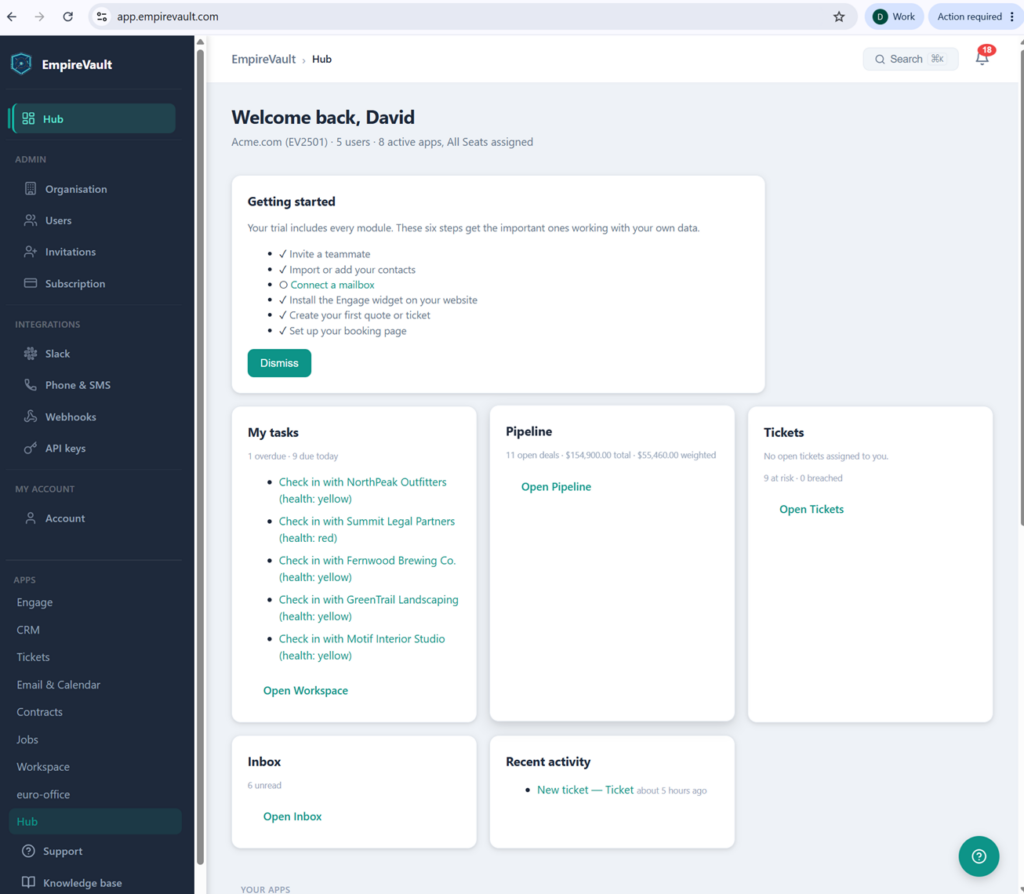
One admin screen for the whole account: who is in, what they can reach, which mailboxes are connected, and what you pay.
- Start the day on one screen: tasks due, pipeline, tickets at risk and unread mail, with Ctrl/⌘K search from anywhere
- Three roles, admin, member and read-only, plus a seat on each tool a person uses
- Set up a teammate’s mailbox before they arrive; it activates when they accept the invitation
- One plan, $39 a seat a month; seats follow your member count
- Single sign-on via WorkOS, SAML or OIDC, with Azure AD and Okta supported
- An immutable audit log across every module, filterable for compliance
Start Free Trial
Free for 21 days. One seat, every module, no credit card.
EmpireVault Hub is where an admin runs the account: people and roles, the mailboxes connected for each person, the subscription, and the integrations the whole team relies on. It is also where everyone starts the day, on a home screen that pulls the work that needs you from every tool you have a seat on.
How It Works
1. Add People
Invite teammates by email or import a CSV once you subscribe (a trial is a single seat). Give each person a role and a seat on the tools they use. Approve requests from people who ask to join with your customer number, and suspend or deactivate anyone at any time.
2. Prepare Their Mail
Add a mailbox for a member, for an outstanding invitation, or a shared one used only for sending. Server settings fill in from the address. A mailbox set up against an invitation waits as “Waiting for invitee” and activates when they accept, or asks them for the password if you didn’t have it. Microsoft 365 mailboxes are connected by the person themselves with their own sign-in.
3. Keep It Running
The Mailboxes page shows every mailbox’s owner, purpose, health and last sync. Test a connection, reset credentials, switch between live and polling delivery, follow folders, reassign a mailbox to a new owner, or deactivate it. Nothing on this page opens anyone’s messages, and a stored password is never shown.
Key Capabilities
Start Your Day on One Screen
The Hub opens on a Today dashboard: tasks due and overdue, pipeline value weighted by stage probability, tickets that need you with SLA at-risk counts, unread inbox, and a cross-module activity feed — each widget appears only for the tools your team actually uses. And from anywhere in the platform, press Ctrl/⌘K to search contacts, companies, deals, leads, tickets, quotes, tasks, and documents in one keystroke — with quick-create actions, and results that respect each person’s permissions.
Getting Started Checklist & Sample Data
A new organisation picks a starting point: the chat widget, CRM, tickets, quotes, or email & calendar. Admins then see a Getting Started checklist that ticks itself as real setup happens: add contacts, connect a mailbox, install the widget, create a quote or a ticket, set up a booking page, and invite a teammate once the account is subscribed. An empty account can load labelled sample data (contacts, deals, tickets, one draft quote) and remove it with one click. Sample data never sends email.
User Management
Invite new users, approve pending sign-ups, suspend accounts, or deactivate departing team members. Bulk-invite with a CSV. Users can belong to multiple organisations and switch between them from the sidebar. A trial is a single seat; inviting teammates opens the moment you subscribe, and pending invitations stay valid for seven days.
Roles & Seats
Three roles: admin (full access), member (day-to-day use) and read-only (view only). Each person also holds a seat on the tools they use, so a salesperson need not see the help desk. A separate super-admin flag is reserved for EmpireVault operators. Permissions are enforced on every request.
Single Sign-On
Authenticate through WorkOS with support for SAML and OIDC protocols. Connect Azure AD, Okta, Google Workspace, or any compliant identity provider. Users sign in once and access every EmpireVault module without additional credentials.
Subscription & Billing
One plan, every module, $39 a seat a month. Seats follow your member count, so there is nothing to add or reduce by hand. Stripe handles checkout, payment methods and invoices through its billing portal, linked from the Subscription page. Cancel at any time: the account stays read-only for 30 days so admins can export, then locks.
Mailboxes
Every mailbox in the organisation on one page: who it belongs to (a member, an outstanding invitation, or shared), what it is for (inbox, campaigns, tickets), its health, how new mail reaches it, and when it last synced. Admins manage access and settings, never content. EmpireVault also remembers the mail settings it discovered for each domain, so the next mailbox on that domain starts from them, and a wrong guess is corrected once.
Integrations
Each integration has its own page in the Hub sidebar: Slack destinations, a Phone & SMS number on your own Twilio or Telnyx account with call forwarding, voicemail and missed-call text-back, signed Webhooks, API keys for the REST API, and Enrichment credits for Find a prospect in the CRM, bought 1,000 at a time with optional auto-recharge and a monthly cap. See Integrations for the full list.
Immutable Audit Log
Every significant action across the platform — logins, record changes, permission updates, billing events — is recorded in a tamper-evident audit log covering over 350 event types. Filter by user, action, resource, or date range for compliance reviews and incident investigation.
Slack Notifications
Route key events from across the platform straight to your team’s Slack channels, so the right people hear what matters the moment it happens: new leads, new support tickets, won deals, accounts whose health is slipping, accepted team invitations, and form submissions you choose. Add and manage channel destinations from the Hub, choose which events each channel receives, and send a test message to confirm. Connections use Slack Incoming Webhooks; webhook URLs are stored encrypted.
Ready to Get Started?
Set up your organisation, pick a starting point, and connect your first mailbox today. No credit card required. Invite your team when you subscribe.
Additional Hub Capabilities
Multi-Organization Support
Users can belong to multiple organizations and switch between them seamlessly via a tenant switcher in every sidebar. Each organization has its own data, roles, seats, and billing. Ideal for agencies, consultants, or teams managing multiple business units.
Bulk User Import
Import users via CSV upload with a downloadable template once the account is subscribed. Bulk invite your team during onboarding instead of sending invitations one at a time. The system validates emails, checks for duplicates, and assigns roles automatically.
Subscription Lifecycle
Self-service subscription management: subscribe, change payment details, or cancel through the billing portal. After cancellation your account stays read-only for 30 days so admins can export data, and every page still opens; saves resume the moment an admin reactivates. The trial itself runs 21 days, followed by a short read-only grace period.
Daily Digest & Notifications
Every person gets an 8am daily digest of what needs them: unread mail, tasks due or overdue, and tickets at risk. The notification bell in every tool collects the rest, and each person sets their own preferences.
Prefer to have it built and led for you? EmpireVault is included with Selbytech Fractional CTO + Platform engagements →