
Helpdesk with SLA Tracking — Deadlines You Can See
Support tickets are easy to lose track of once there are more than a handful open. The loud customer gets attention. The quiet one who’s been waiting weeks doesn’t, until it becomes a bigger problem than it needed to be. A dashboard that surfaces SLA health at a glance makes the quiet one impossible to miss.
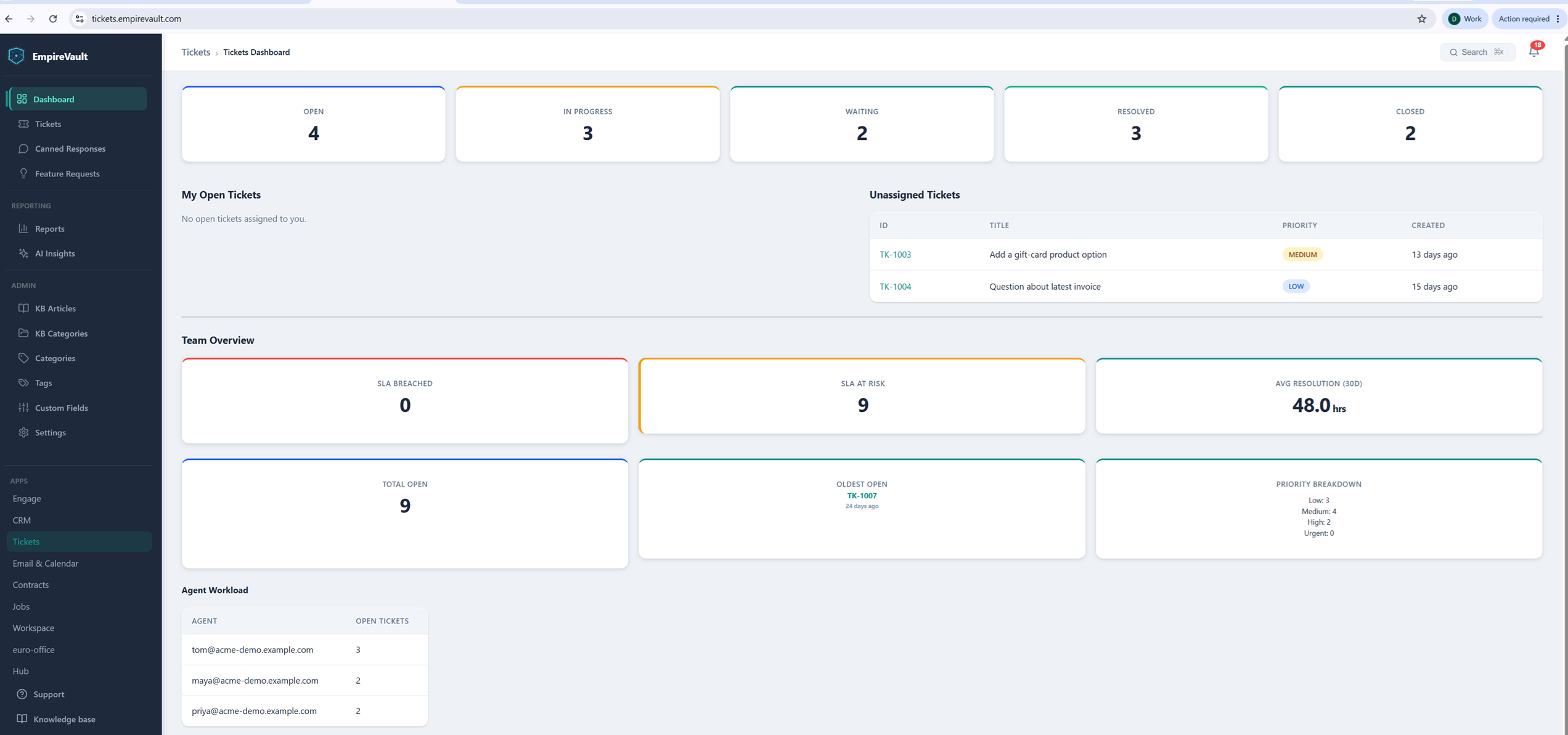
The demo helpdesk’s Tickets Dashboard opens with status cards for the whole queue: 4 open, 3 in progress, 2 waiting, 3 resolved, 2 closed. Those cards show the shape of things before opening a single ticket. A Team Overview panel breaks down SLA health across all of it. Zero tickets have breached their SLA, but nine are marked “at risk” in orange. That orange flag is an early warning that would otherwise stay buried in individual ticket pages. Average resolution time over the past 30 days sits at 48 hours.
Two more numbers round out the picture: total open tickets (9) and the oldest one still waiting. That oldest ticket is TK-1007, open 24 days, flagged so it doesn’t quietly turn into the ticket nobody remembers. A priority breakdown splits the open queue by urgency (three low, four medium, two high, zero urgent). A per-agent workload table shows how those tickets are spread across the team, so a manager can catch an uneven load before an agent has to say something. An unassigned-tickets list sits alongside it, so nothing waits for a human to notice it needs one.
Checking in on support used to mean opening tickets one at a time and building the picture in your head. The Tickets Dashboard does that work up front: breaches versus at-risk, aging, priority, and who’s carrying what. A support lead can see whether the team is on top of things or falling behind before their coffee’s done.
See It with Your Own Data
Every screen shown here ships in one subscription. Try the whole platform free for 21 days.