
Hub Dashboard — Your Whole Business on One Screen
A morning login to a business platform can turn into five logins before the coffee’s finished. There’s one tab for tasks, another for the pipeline, another for the help desk. Whichever app happened to open first shows only its own slice of the day.
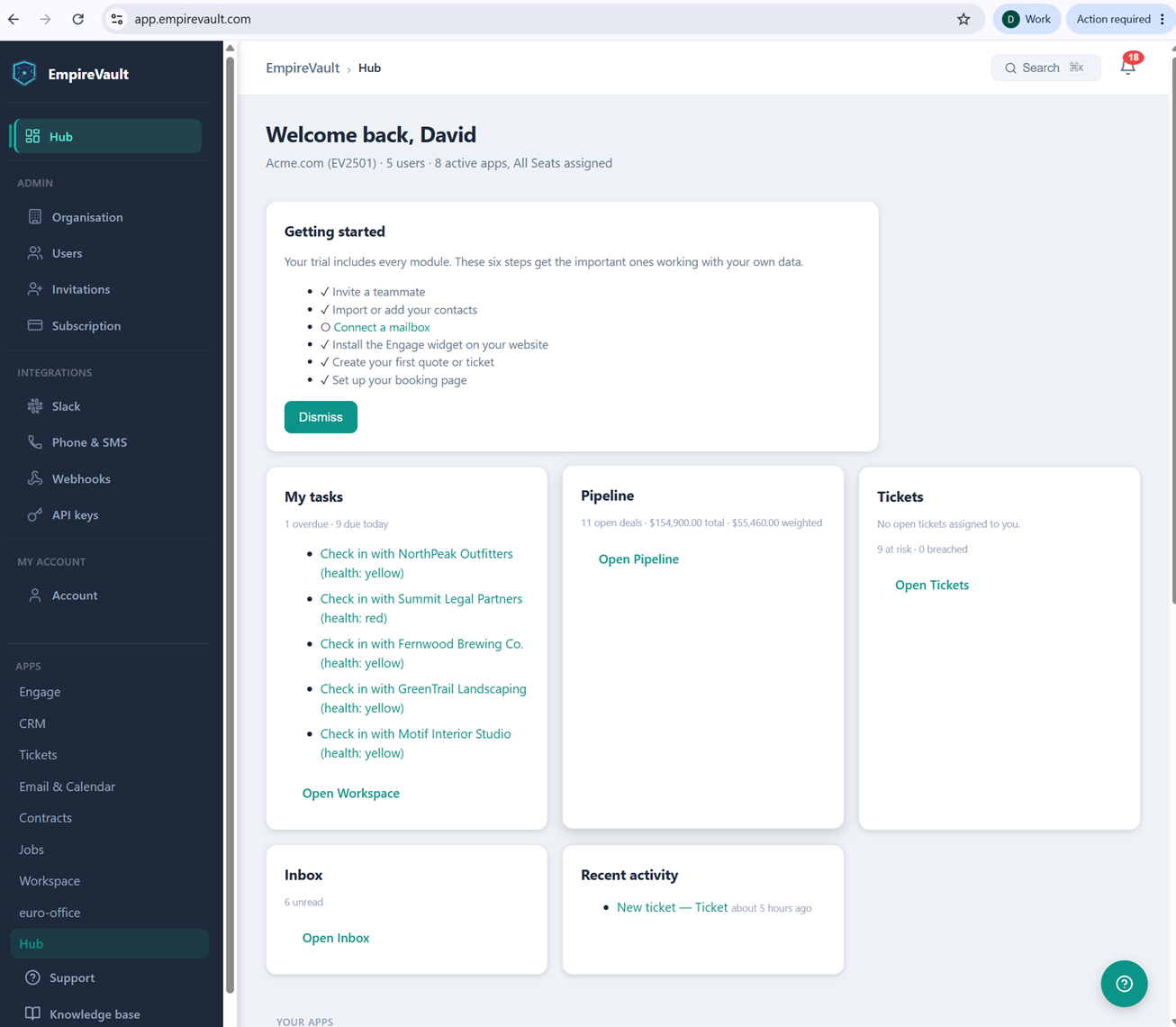
What’s pictured is EmpireVault’s Hub, the single screen this demo workspace (Acme.com, 5 users, 8 active apps, all seats assigned) lands on at login. A Getting Started checklist tracks setup progress: five of six steps done, with “Connect a mailbox” still open. Five more cards fill in the rest of the morning. A My Tasks card totals one overdue task and nine due today. It lists five client health check-ins by name. Summit Legal Partners is flagged red, and the other four (NorthPeak Outfitters, Fernwood Brewing Co., GreenTrail Landscaping, and Motif Interior Studio) are flagged yellow. A Pipeline card totals 11 open deals worth $154,900 ($55,460 weighted). A Tickets card reports nothing assigned to you right now against nine at risk elsewhere. An Inbox card shows six unread messages, and a Recent Activity feed logs a new ticket from five hours ago.
The same sidebar links out to Pipeline, Tickets, and Workspace. It also groups Slack, Phone & SMS, Webhooks, and API keys under an Integrations heading. Those are the connections that let Hub data reach the rest of a team’s stack: a Slack ping on a new lead, an outbound webhook, an API pull. They work without a separate login to go configure them.
The Hub’s job is to answer “what needs me today” in one glance instead of four separate app logins. Pipeline value, ticket risk, unread mail, and the clients due for a check-in are all read from one screen. Everything else EmpireVault does sits one click away in that same sidebar.
See It with Your Own Data
Every screen shown here ships in one subscription. Try the whole platform free for 21 days.