
SMS in the Inbox — Texts Next to Email
Customers who text instead of emailing usually land somewhere else entirely: a phone’s native messages, or a separate texting tool. They end up cut off from the same record that holds their email history.
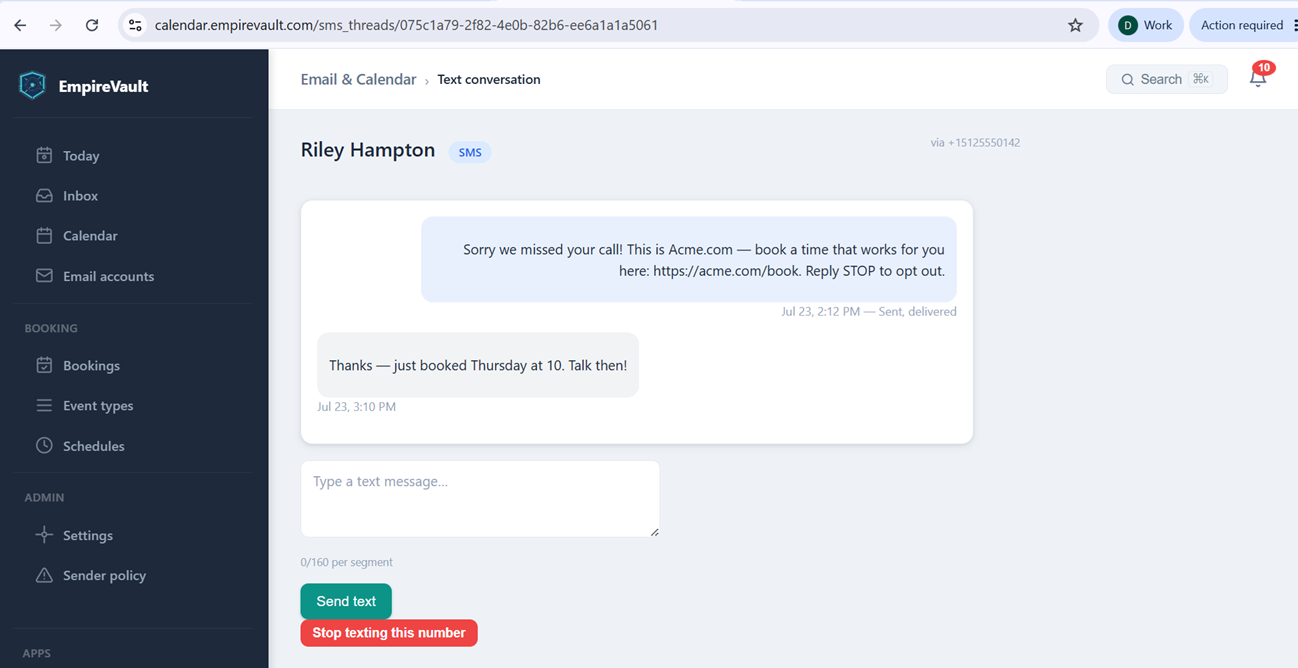
Pictured is a two-way text thread with Riley Hampton, sent and received via the business number +15125550142. An “SMS” tag next to the name keeps it from being mistaken for an email at a glance. The thread sits inside EmpireVault’s Email & Calendar app, alongside Inbox, Calendar, and Email accounts in the same left-hand navigation, rather than in a separate messaging tool. The first message is the automatic missed-call text-back — “Sorry we missed your call!… Reply STOP to opt out.” — logged as “Sent, delivered” at 2:12pm. That delivery confirmation sits right under the message instead of being a guess. The reply, “Thanks — just booked Thursday at 10. Talk then!”, came back an hour later at 3:10pm.
A reply box below the thread counts characters against the 160-per-segment SMS limit. A Send text button sits beside a “Stop texting this number” option. That option honors an opt-out immediately rather than waiting on a STOP reply to be parsed by the carrier. Every message here traces back to the same Phone & SMS connection handling calls and voicemail on this number. That connection is the one behind the automatic text-back in the first place. Once the number itself is set up, there’s nothing extra to configure just for texting.
Whoever’s answering this number gets a text and an email from the same customer sitting next to each other, not scattered across two different tools. A reply here comes with the same context a rep would have opening an email thread instead, delivery status included.
See It with Your Own Data
Every screen shown here ships in one subscription. Try the whole platform free for 21 days.