
Included for Paid, Trusted Subscribers
Business Email on Your Own Domain
Your addresses at your domain, hosted by EmpireVault and answered in the same place as your customers, your calendar and your tickets. One less provider to pay and log in to.
Hosting is included for paid, trusted subscribers; it is not included in the free trial. EmpireVault-hosted sending includes 100 emails per day per seat, with extra capacity available using enrichment credits.
Why Host It Here
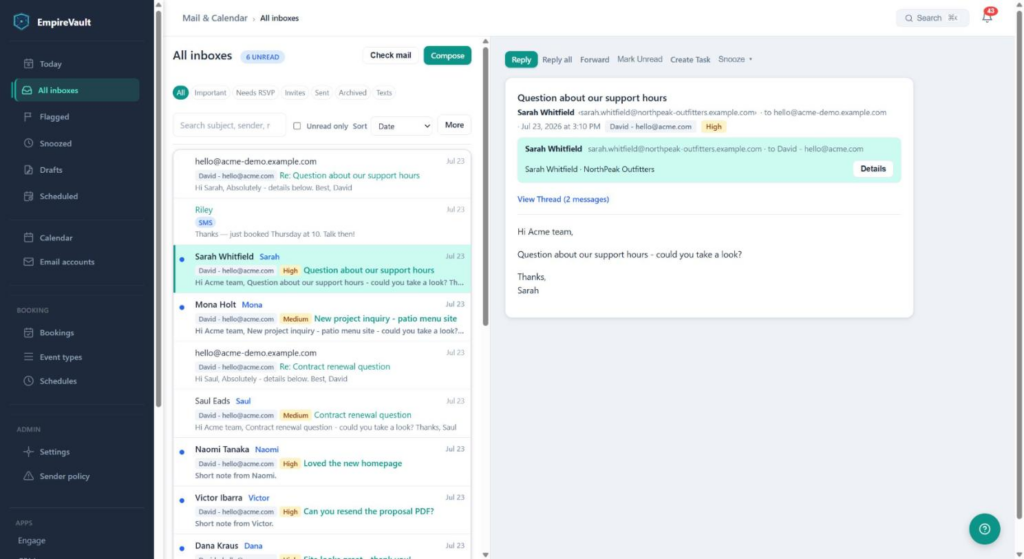
One place for mail and customers
Each message already sits on the contact, deal or ticket it belongs to. Replies, campaigns and ticket mail can all go out from your own addresses.
No server settings to type
Create a mailbox for a teammate, or one for every member at once. EmpireVault configures the mailbox in your workspace automatically. Connection settings are available for other mail apps.
Works in the mail apps you already use
Each mailbox has IMAP and SMTP settings for Apple Mail, Outlook, Thunderbird or your phone, alongside the EmpireVault inbox.
How the Move Works
- Prove you own the domain. One record. Your email keeps arriving where it does today.
- Let EmpireVault send for the domain. The records that let receiving servers trust your mail (SPF, DKIM, DMARC). Still nothing moves.
- Create your mailboxes. Every address that receives mail today, before anything switches.
- Switch your mail over. One MX record. From then on new mail arrives in EmpireVault.
Nothing about where your mail goes changes until step 4, and the page tells you when each record is right.
Setup That Speaks Your DNS Provider’s Language
Pick GoDaddy, Namecheap, Cloudflare, Squarespace or Wix and every record is shown as the boxes that provider’s form has, each with a Copy button. EmpireVault checks your records every 15 minutes and points out the usual mistakes: a name typed in full so the domain appears twice, a second SPF record, a record at the wrong host. If someone else runs your DNS, print the instructions or forward the email EmpireVault sends when you add the domain.
What You Get
- Email hosting at no extra subscription cost for paid, trusted subscribers
- 100 hosted emails per day per seat, with extra hosted sending capacity available using enrichment credits
- Addresses at your own domain for your team, plus addresses such as info@ for campaigns or tickets
- The EmpireVault inbox, Today and calendar, on the web and on a phone
- IMAP and SMTP for any mail app
- SPF, DKIM and DMARC records generated for you, and a warning if your SPF record grows past what receiving servers accept
- An email to the admin when the domain goes live, with what helps a new domain’s mail land in the inbox
Common Questions
Who can use email hosting?
Hosting is available to all paid, trusted subscribers, at no extra subscription cost. Contact us about hosting for your domain.
Does email cost extra?
Email features add no extra subscription cost. EmpireVault-hosted sending includes 100 emails per day per seat. Extra capacity is available using enrichment credits. This allowance applies only to email hosted by EmpireVault. Connected Microsoft 365, Gmail and other mailboxes follow their provider’s sending limits.
Do I have to move my email to use EmpireVault?
No. You can keep Microsoft 365, Gmail or any IMAP mailbox and connect it instead. Hosting is for when you want one provider fewer.
What happens to my existing mail?
New mail arrives in EmpireVault from the moment you switch. Mail already in your old provider stays there; you can keep that mailbox connected while you need it.
Can I keep using Outlook or Apple Mail?
Yes. Each mailbox has IMAP and SMTP settings for any mail app.
Will my mail land in spam?
Your domain’s SPF, DKIM and DMARC records are generated for you. A brand-new domain can still land in spam for its first weeks while receiving servers learn it; the go-live email explains what helps.
How many mailboxes can I have?
Tell us how many addresses you need when you contact us about hosting.