
Tickets — AI Help Desk & Customer Support
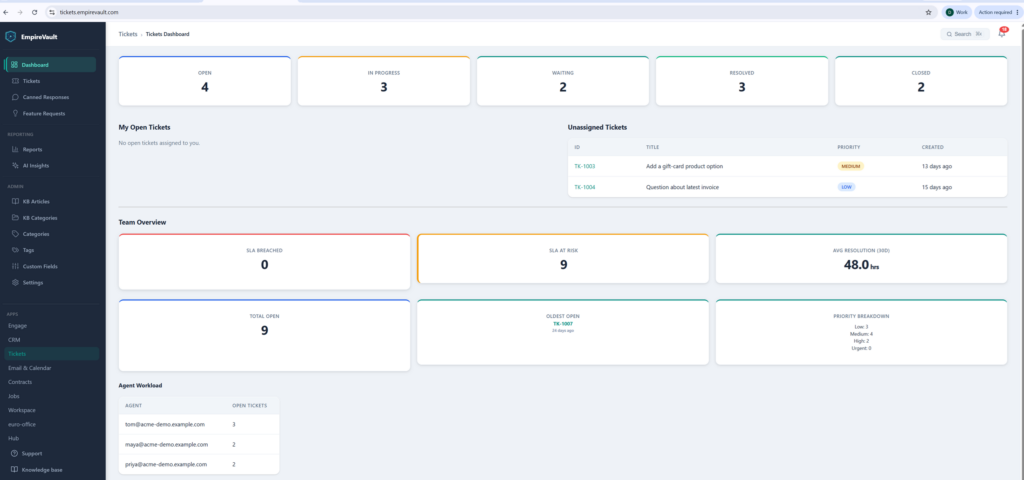
See SLA risk across your whole queue at a glance — before a ticket breaches, not after.
- SLA policies by priority, with business-hours-aware clocks and breach alerts
- AI triages every incoming ticket — category, priority, sentiment, and duplicates
- Agent workload and resolution-time reporting, filterable and exportable to CSV
- A customer self-service portal, knowledge base, and CSAT ratings, included
Start Free Trial
Free for 21 days. No card required.
A complete ticketing system with AI triage, SLA enforcement, a customer self-service portal, knowledge base, feature request voting, and CSAT ratings — all in one tool. AI handles the repetitive classification and drafting work while your agents retain full control over every customer interaction. Every AI suggestion is reviewed by a human before it reaches your customers.
How It Works
1. Tickets Come In — AI Triages Instantly
Tickets arrive via email ingestion or the customer portal. AI immediately categorizes each ticket, sets priority, detects sentiment and urgency, identifies potential duplicates, and assigns a confidence score to every classification. Routing recommendations suggest the best agent or team based on ticket content and workload. All of this happens in seconds, before an agent even opens the ticket.
2. Agents Work with AI Assistance
Agents see AI-generated draft replies, thread summaries, and translation for multilingual tickets. Every suggestion is clearly marked as AI-generated and editable — agents review, modify, and approve before anything is sent. Agents mark AI suggestions as helpful or incorrect, providing feedback that improves recommendation quality over time. The human always has the final say.
3. Resolve, Measure, Improve
SLA policies track response and resolution times by priority level with business hours awareness. Resolved tickets auto-close after a configurable period. CSAT ratings collect customer satisfaction scores and comments from the portal — they roll up into the Reports module, with per-agent and per-category breakdowns and CSV export. Reporting dashboards show volume trends, resolution times, agent performance, SLA compliance, and satisfaction scores. Every report filters by 7, 30, or 90 days, or all time, with CSV export for deeper analysis. Tickets that need you also appear on the Hub’s Today dashboard beside your mail and meetings — see the day’s customer activity in one place.
Detailed Capabilities
AI-Powered Ticket Intelligence
- Auto-Triage — AI categorizes incoming tickets, sets priority, detects sentiment and urgency, and identifies duplicates with confidence scores
- Draft Replies — AI generates response drafts based on ticket context and conversation history for agent review
- Thread Summarization — Long ticket threads condensed into actionable summaries so agents get up to speed instantly
- Translation — Multilingual support translates tickets and replies, removing language barriers from your support workflow
- Routing Recommendations — AI suggests the best agent or team for each ticket based on content analysis and specialization
- Agent Feedback Loop — Agents mark AI suggestions as helpful or incorrect, creating a feedback mechanism that refines future recommendations
AI Governance & Controls
- Human-in-the-Loop — Every AI suggestion is reviewed and edited by an agent before reaching customers. AI assists; humans decide.
- Per-Tenant Rate Limiting — Configurable daily and monthly AI usage caps prevent runaway use, and AI is included in your seat price. Admins can disable AI features entirely.
- Usage Logging — Every AI call is recorded with feature type, token count, and model used for full auditability
SLA & Workflow Automation
- SLA Policies by Priority — Define response and resolution time targets per priority level (critical, high, medium, low)
- Business Hours Awareness — SLA clocks pause outside configured business hours so agents are not penalized for off-hours time
- Breach Detection & Notifications — The dashboard shows at-risk tickets before they breach; when a deadline is missed, the assignee and admins get an alert
- Auto-Close Resolved Tickets — Tickets in “resolved” status are automatically closed after a configurable waiting period
- Custom Fields, Tags & Categories — Organize tickets with custom fields for your workflow, tags for flexible grouping, and categories for structured classification
- Internal vs. External Comments — Internal notes visible only to agents alongside customer-facing replies on the same ticket thread
Email-to-Ticket Ingestion
Connect your support mailbox in Email & Calendar and we switch ticket intake on for it during setup. From then on, customers email your support address and a ticket is created automatically; the auto-response includes the ticket ID, and replies thread into the existing ticket. Existing mailbox history is never imported.
Customer Self-Service Portal
- Token-Based Access — Customers access their tickets via a secure link with no login or account creation required
- Submit & Track Tickets — Customers submit new tickets with category selection, custom fields, and tags, then track status in real time
- Add Comments — Customers reply to their tickets directly from the portal
- CSAT Ratings — Customers rate resolved tickets from the portal, with a comment; scores roll up into Reports
Knowledge Base
- Public-facing articles organized by category with full-text search
- Helpful / not helpful feedback on every article to identify content gaps
- Suggested articles surface during ticket creation to deflect common questions
Feature Request Board
Included with every account — the voting board and CSAT ratings other helpdesks sell as paid add-ons.
- Customers and agents submit feature requests; users vote to surface demand
- AI scores each request on impact, effort, and strategic alignment
- Duplicate detection via group key consolidates related requests
- Manager priority override for manual ranking adjustments
- Status workflow with email notifications keeps requesters informed
Reporting & Analytics
- Volume trends, resolution time distributions, agent performance rankings
- SLA compliance rates and CSAT score analytics
- Period filtering: 7 days, 30 days, 90 days, or all time
- CSV export for custom analysis in spreadsheets or BI tools
What Makes Tickets Different
AI That Assists, Not Replaces
Unlike tools that auto-send AI responses to customers, every AI-generated suggestion in EmpireVault Tickets is reviewed and approved by a human agent before it reaches the customer. AI handles the time-consuming classification, drafting, and summarization work. Your agents make the decisions. This is not a chatbot — it is an intelligent assistant with a mandatory human approval step.
Transparent AI Governance
Full visibility into AI usage with per-tenant rate limiting, daily and monthly caps, feature-level usage logs recording every token, and the ability to disable AI entirely. No surprise bills, no opaque usage. Admins control exactly how much AI their team uses and can audit every interaction.
Complete Support Stack in One Tool
Ticketing, SLA management, knowledge base, customer portal, feature request voting, CSAT ratings, and AI assistance — integrated in a single tool instead of stitched together from five different vendors. One data model, one permission system, one reporting dashboard. No integration tax, no data silos.
Prefer to have it built and led for you? EmpireVault is included with Selbytech Fractional CTO + Platform engagements →