
Company Profile — Health Scores, Custom Fields, and Full History
A “how’s this account doing” question usually gets answered from memory. That memory is a vague sense that things are fine, or a nagging feeling something’s off, with no data behind either. A company profile with a health score turns that gut feeling into a number you can act on.
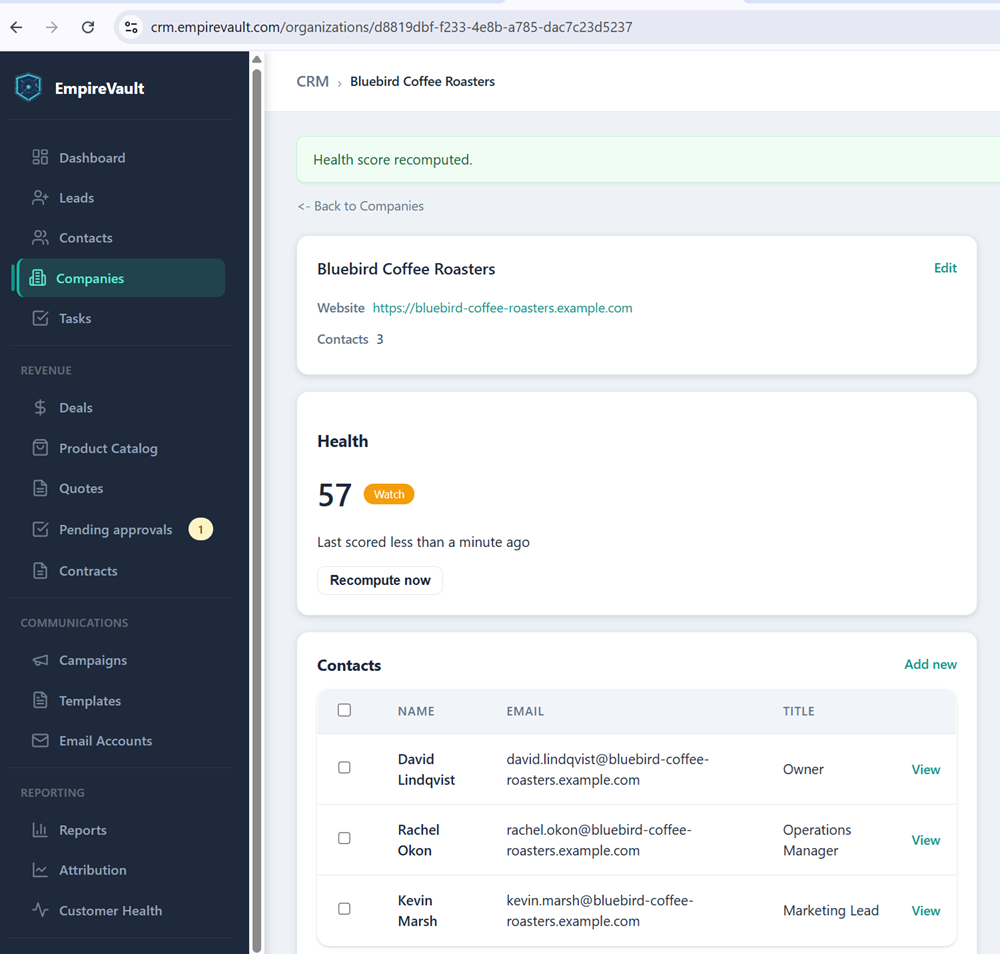
Bluebird Coffee Roasters’ record in EmpireVault’s demo workspace carries custom fields for Tech Stack and Contract Renewal alongside the standard details. A handful of tags mark how the account is categorized. Its health score reads 57 with an orange “Watch” badge. That is not a crisis, but a clear signal something here needs attention before it becomes one. Below that sits the activity timeline: emails, calls, deals, and tickets tied to this company, in one scroll, alongside its three contacts.
The score itself is engagement-weighted, not a guess. It factors in how recently someone here opened an email, how many tickets are open and how old they are, and whether a deal closed recently. The score recalculates automatically overnight, or on demand with a “Recompute now” button. An orange “Watch” badge sitting at 57 is exactly the kind of signal that lets a renewal conversation start early. There’s still time then to fix whatever’s slipping, not after the account’s gone quiet for good.
In practice, this profile is where a rep or account manager starts before any call. The custom fields tell you what this client runs and when their contract is up. The tags tell you how they’re segmented, and the health score tells you whether this is a check-in or a save. None of it required a separate spreadsheet or a status meeting to know.
See It with Your Own Data
Every screen shown here ships in one subscription. Try the whole platform free for 21 days.