

Short answer: send quotes as plain email text for small jobs, as a PDF or online quote link for itemized work, and as an e-signature document when you need acceptance you can enforce. Include scope, price, and a validity date so the customer never has to ask a clarifying question, then follow up on day 3, 7, and 14 until the quote is accepted or closed.
Key Takeaways
- Match the channel to the deal size: email text for small jobs, PDF or online quote for itemized service work, e-signature for high-value or deposit-backed work.
- Every quote needs itemized scope, a validity window, payment terms, assumptions, and exclusions. Those five fields prevent most clarification emails.
- Build 3–5 templates before site visits so you can send a formal quote in minutes instead of promising to “send something over tonight.”
- Run a fixed four-touch follow-up: day 0, 3, 7, and 14.
- Never edit a sent quote in place. Send revisions as new numbered versions and mark the old one superseded.
Email Text, PDF, or E-Signature: Which Channel When?
The channel should match the commitment level. A $400 handyman job and a $12,000 kitchen remodel should not travel the same way.
Email Text: Fast, Informal, Easy to Lose
Use plain email text for small jobs, repeat customers, and same-week work. The customer replies “approved” and you start. The trade-off: the approval lives in an inbox thread, not a tracked record, and there is no signature to point to if scope gets disputed later.
PDF or Online Quote: The Default for Most Service Work
Once a job involves line items, materials, or a timeline, send a formal quote. It looks consistent, it is easy for the customer to forward to a spouse or business partner, and it gives both of you a fixed version to reference. An online quote link goes one step further: the customer accepts in the browser, and you are not left wondering whether the attachment was ever opened.
E-Signature: When Acceptance Needs to Be Binding
Use e-signature for high-value work, custom builds, or anything with deposits and change orders. In the US, the ESIGN Act generally gives an electronic signature the same legal weight as a handwritten one, provided both parties have agreed to do business electronically.
| Channel | Best for | What acceptance looks like |
|---|---|---|
| Email text | Small jobs, repeat customers | A reply in a thread |
| PDF or online quote | Most service quotes with line items | A fixed document both sides can reference |
| E-signature | High-value work, deposits, change orders | A signed record with an audit trail |
What Should a Quote Include So the Customer Doesn’t Write Back With Questions?
Six things: an itemized scope of work, a validity window, payment terms, an assumptions list, an exclusions list, and your contact details with a clear way to accept. Miss one and the customer replies with a question instead of a yes.
Line Items, Validity Window, and Payment Terms
Break the quote into named line items with quantities and unit prices, not one lump sum. Customers question lump sums; they approve line items. State how long the price holds (30 days is common) and when payment is due, so acceptance starts the work instead of starting another email thread.
The Two Fields Most Quotes Miss: Assumptions and Exclusions
Assumptions say what you expect to be true, such as access to the site during business hours. Exclusions say what the price does not cover, such as permit fees or haul-away. These two fields head off most revision cycles, because the “why isn’t X included?” conversation happens on the quote itself, before anyone has agreed to a number.
How Do You Send a Quote While Still On-Site?
Start From a Template, Not a Blank Page
Never write a quote from scratch in the driveway. Before the visit, build 3–5 templates covering your most common jobs, with line items, labor rates, and terms already filled in. On-site, you pick a template, adjust quantities, and send it from your phone or tablet. That turns a 20-minute desk task into a few minutes, and it is the difference between quoting before you leave and promising to “send something over tonight” (and then not doing it).
Get the Verbal Yes, Then Send the Quote Before You Drive Off
Walk the customer through the number in person, get the verbal yes, then send the formal quote while you are still parked outside. Some customers will accept before you leave. If you can’t send from the job, send it the same afternoon, while the conversation is still fresh for both of you. Sending the same day also makes view tracking useful. If your quoting tool records when the customer opens the quote (EmpireVault logs every view of a quote link, plus email opens and clicks), a same-day send with no views by the next morning tells you to pick up the phone rather than send another email.
What Follow-Up Cadence Gets Quotes Accepted Without Annoying the Customer?
Most quotes die in silence, not rejection. A fixed four-touch sequence over 14 days keeps you in front of the customer without becoming a nuisance, and takes a few minutes per quote.
Day 0: Send and Confirm Receipt
Send the quote the same day you discuss it. Within the hour, send a one-line “did that come through?” message. It catches bounced emails and typo’d addresses while you still have the customer’s attention.
Day 3: Add Something Useful
Not “just checking in.” Send a relevant photo, a spec sheet, or a one-paragraph summary of the scope. It answers the question they were probably going to ask anyway.
Day 7: Mention a Real Deadline
This is the only touch where urgency belongs. Mention a genuine constraint: your calendar filling up, a supplier price that expires, a start-date window. If the constraint is made up, skip it. Customers remember fake deadlines longer than they remember quotes.
Day 14: Close the File
Send a short, no-pressure exit: “I’ll assume this isn’t a priority right now. Reply if you’d like me to keep it open.” This message often gets a reply when the others didn’t, because it gives a quiet customer an easy way to say yes (or a clear no). If nothing comes back, mark it closed and stop.
Why a Fixed Cadence Beats Deciding Case by Case
When you decide each time whether to nudge, the quotes you feel awkward about are exactly the ones that go quiet, and those are often the biggest ones. A written sequence means the awkward quote gets the same day-3 and day-7 touches as the easy one. It also means a busy week or a new hire can’t silently stop follow-up, because anyone on the team can see which day each quote is on. That only works if quote status lives somewhere everyone can see it, not in one person’s head or a spreadsheet.
How Do You Handle Revisions Without Losing Track of Versions?
Use a Version Number You Can Say Out Loud
Put the version number in the quote title, the filename, and the footer: “Smith Roofing — Quote v3 — 2026-10-14.” When the customer calls, you both say the same number, which is the simplest way to confirm you are discussing the same terms. Never reuse a number, even for a typo fix. A corrected v3 becomes v4.
Supersede, Don’t Edit
Editing a sent quote in place is how someone ends up accepting an outdated price. Mark the old version superseded, send the new one as a fresh document, and keep the old copy with the job record in case questions come up later.
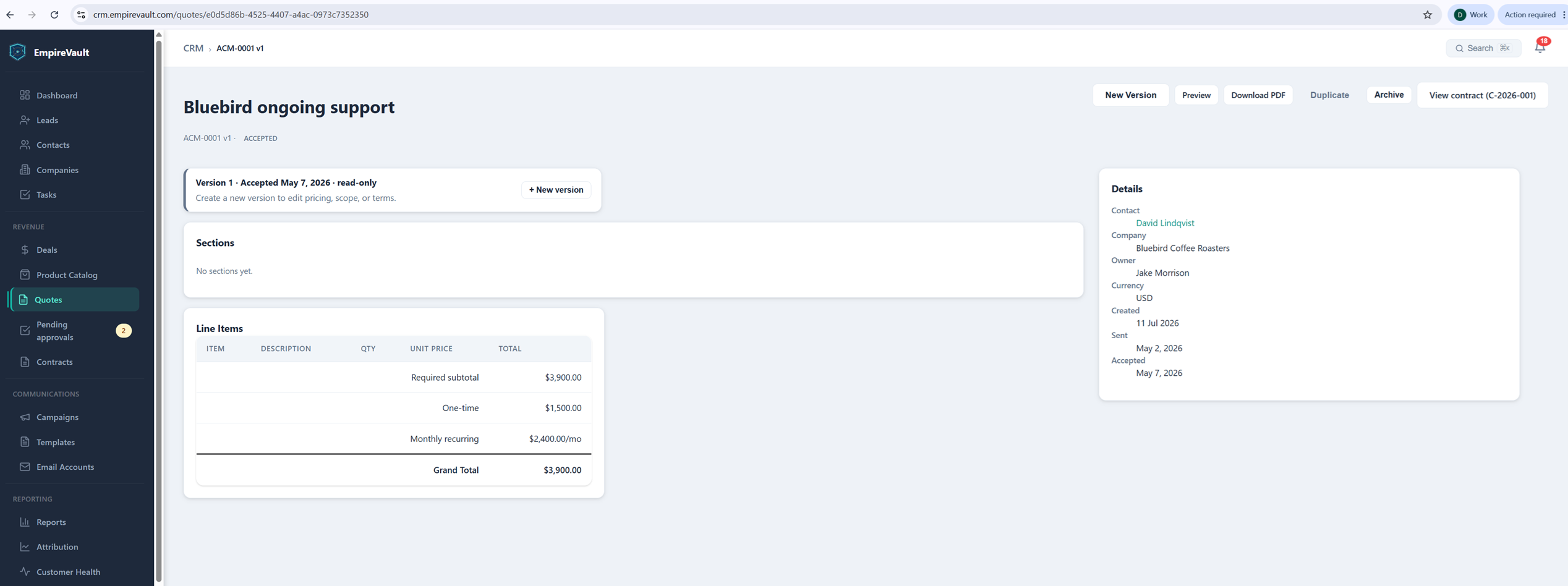
This is how EmpireVault Quotes works by default: every revision is saved as its own version, you can compare versions side by side, and once a quote is accepted its line items lock, so changing the price means creating a new version rather than quietly editing the old one.
When Is a Quote Legally Binding?
Offer, Acceptance, and the Wording That Matters
Generally, a quote becomes binding when there is a clear offer, the customer accepts it, and something of value is exchanged. Most quotes already make the offer. What trips owner-operators up is vague wording like “estimate only” or “pricing subject to review,” which signals the quote is not a firm commitment. If you want a quote to hold up, say the price is valid for 30 days, list the exact scope, and state that acceptance creates an agreement. Contract rules vary by state and country, so for high-value work, have your standard terms reviewed once by a lawyer.
What an E-Signature Audit Trail Gives You That a PDF Doesn’t
A signed PDF shows that someone applied a signature. An e-signature tool records who signed, when, and from what IP address, and stores a tamper-evident hash of the document. That record matters when a customer disputes scope months later. In EmpireVault, an accepted quote becomes a contract for signature in one click, and the quote, the signed contract, and the audit trail stay on the same customer record.
How Do You Track Sent, Viewed, and Accepted Quotes Without a Spreadsheet?
A small team needs to answer one question at a glance: which quotes are waiting on me, and which are waiting on the customer? You don’t need a ten-stage sales process for that. A handful of statuses (sent, accepted, declined, expired) plus an expiry date on every quote is enough to see what has gone quiet and needs the next follow-up.
The point is that status should update when the customer acts, not when someone remembers to update a spreadsheet. In EmpireVault, a quote moves to accepted or declined when the customer clicks, expires on its own when the validity date passes, and shows when it was first and last viewed. You can also turn on an automatic reminder email that goes out three days before a sent quote expires, a useful backstop for the follow-up cadence above. Because quotes live in the CRM, all of that sits next to the customer’s history, so you know the context before you call.
Can One Tool Replace Your Quote, E-Signature, and Tracking Stack?
If you run quotes in one subscription, e-signatures in another, and tracking in a spreadsheet, you pay for each and retype the same customer details into all of them. Putting them in one system means entering a customer once and paying one bill. EmpireVault includes CRM, quotes, e-signature, scheduling, and campaigns in one plan at $39 per seat per month, with every module included. Zoho One is another all-in-one option worth comparing on the same terms.
The honest trade-off: a dedicated e-signature or proposal tool may have deeper features in its one area than a module inside a broader platform, and moving everything to one system means your team has to learn it. If your current setup works and you are not retyping data, there is no urgency to switch.
For a deeper look at choosing quoting software, see our sales quotes software guide.
FAQ
What is the best way to send a quote to a customer?
Match the channel to the job. Email text works for small jobs and repeat customers. A PDF or online quote is the default for anything with line items, materials, or a timeline. Use e-signature for high-value work, custom builds, or anything involving deposits, so you have acceptance you can enforce if scope is disputed later.
How long should I wait before following up on a quote?
Follow up on day 3, day 7, and day 14 after sending. Day 3 adds something useful like a photo or spec sheet, day 7 mentions a real deadline such as expiring material pricing, and day 14 is a no-pressure close-the-file message.
Is an emailed quote legally binding?
It can be, when there is a clear offer, the customer accepts it, and something of value is exchanged. Vague wording like “estimate only” weakens the offer. State that the price is valid for a set period, list the exact scope, and say that acceptance creates an agreement. Rules vary by jurisdiction, so have a lawyer review your standard terms for high-value work.
How do I send a quote for e-signature?
Build the quote as an itemized document with line items, validity dates, payment terms, assumptions, and exclusions, then send it through a tool that collects an e-signature and keeps an audit trail. Check whether the customer has viewed it; a quote with no views after a day calls for a phone call, not another email.
How do I send a revised quote?
Send it as a new numbered version, never as an edit to the one already sent. Mark the old version superseded, keep it with the job record, and make sure the customer accepts and pays against the latest version only.